Command Line Interface agents
Tier four of this ladder is the one that stops looking like a conversation. The assistant still answers questions, and it also does things: it opens your files, runs your commands, reads what came back, and tells you where it stands. Nothing in the first three tiers does that. This is the tier where the model gets your shell.
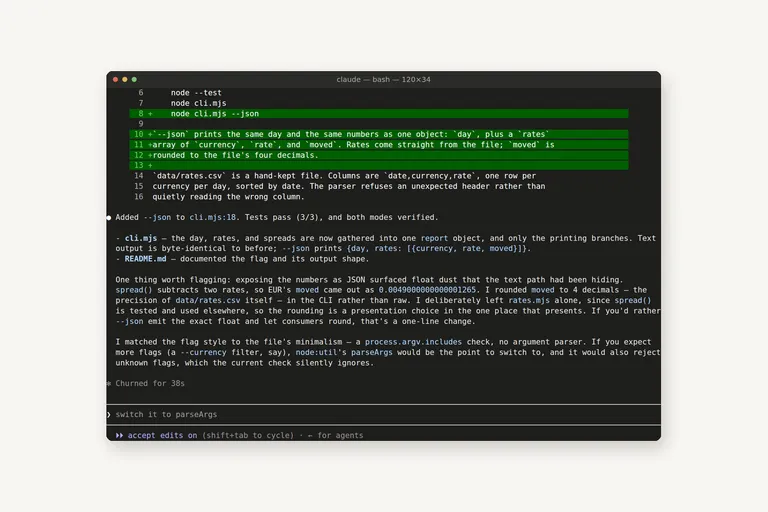
Everything below is tier four, the tier where the assistant works on your own machine, inside your own folder, with the rights you have. It is also the first tier where a careless setting can cost you something, so the safety here is not a footnote. It is the price of admission.
[ fig. Tier 4: the agents that live in a terminal, as marks. ]
Why the terminal is the fastest surface
A terminal window is about a hundred and twenty columns of text, and that is the whole interface. There is no panel to learn, no sidebar with eleven icons, no project to open. You point the agent at a folder, you type one sentence, and the model reads the folder instead of your description of the folder.
That difference is easy to underrate until you have felt it. Tiers two and three still ask you to carry the context: paste this function, describe this error, explain how the two files relate. In tier four the assistant runs the command itself. It runs the tests. It reads the failure. It tries the fix. You read the result. The copying is gone, and the copying was most of what using an assistant used to cost you.
There is a second reason the terminal wins, and it is less about speed. Everything a command line agent does leaves a trail: which command, which file, which lines. A chat window leaves a scroll. When something goes wrong, one of those is evidence and the other is a memory of a conversation.
First run, step by step
The one I use daily is Claude Code, so the walkthrough is the one I know. The others in the field behave the same way in outline, and the field is the next section.
1. Install it, then run it inside the folder you want it to work in. Not the whole drive: one project. The command is `claude`, and it starts in the directory you are standing in, which is the only context it has.
2. The first run asks whether you trust the folder. Read that screen: it says what the agent will be able to do here before you have typed anything. In a folder with a settings file it also lists the permissions that file pre-approves, and it names them one by one.
3. Per-project rules live in `.claude/settings.json`. The allow list holds tools and command patterns, and the default mode decides how much stops to ask. Mine pre-approves reading, editing, writing and `node`, which is the list I would give a colleague.
4. Then you type a task, not a prompt. "add a --json flag to cli.mjs" is a task. The difference is that a task can be checked: the flag either exists afterwards or it does not.
5. Read what it says before it acts, when it says anything. It will often tell you the plan first, and that sentence is the cheapest place in the whole session to stop something you did not want.
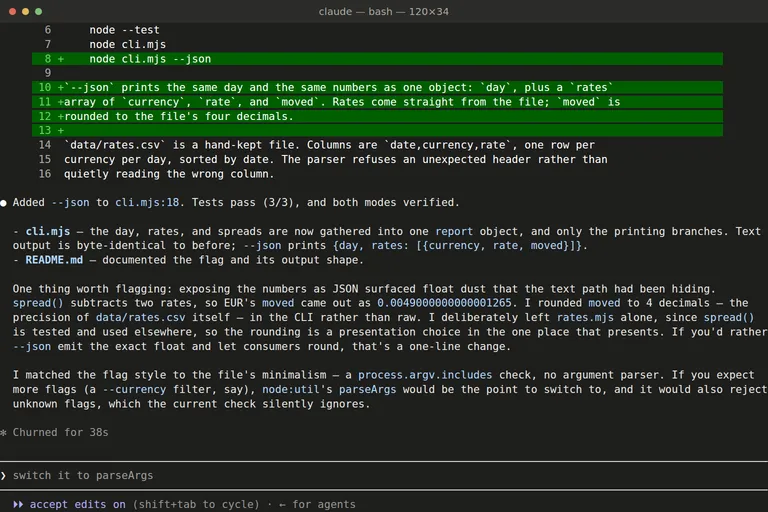
[ fig. The same session as the cover. The tool's own suggested next prompt sits in the input line, dimmed, which is how you can tell it was not typed by me. ]
That session is the shape of the whole tier. It read the project, changed one file, ran the tests, and reported that three of three passed. Then it flagged the thing I would have missed: the flag exposed a float that the text output had been rounding, so the same number looked different in JSON. I did not ask for that observation and would not have found it by reading the diff, because the diff was correct.
What it may touch without asking
This is the part to get right, and it is not complicated. A command line agent asks for permission in one of a few modes, and the mode is a setting rather than a personality.
The middle mode is the one to understand: file edits stop asking, and everything else keeps asking. That is the mode this capture is in, and the prompt is the whole safety story in three lines. Yes, once. Yes, and stop asking for the rest of this session. No. The second option is the one people press without reading, and it is the one that turns a helpful assistant into a program with your keys.
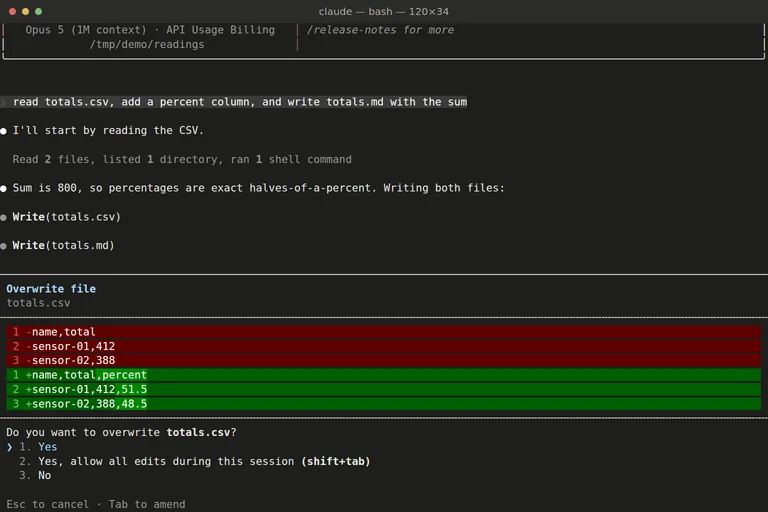
[ fig. The permission prompt, captured live. The middle option is the one worth reading twice. ]
The rules I keep, and they have earned their place one at a time:
1. Start in the asking mode and loosen it per project. A folder I trust gets a settings file. A folder I am exploring gets the default.
2. Read what the allow list actually matches. An allow rule matches whole commands, so a rule for `python3` does not cover `ls && python3 something.py`, and that second one still stops and asks. Compound commands are where a tidy-looking list quietly leaks.
3. Commit before you let it loose. Not distrust. It is the difference between answering "what changed" with a command and answering it with a guess.
4. One thing per request. A small diff you actually read beats a large diff you approve because it looks plausible.
5. Read the diff, not the summary. The summary is written by the thing that made the change. The diff is the change.
The field
Five tools are worth knowing by name, and they differ less in what they can do than in where the work happens and who is allowed to stop it.
Claude Code is Anthropic's, and it is the one this piece is written from. Who it is for: anyone who writes or maintains files for a living and has stopped believing that a chat box is the right shape. Cost: it comes with a Claude subscription, and pay-per-token through an API key is the alternative; the CLI tells you which one you are on at the top of the session, which is a setting worth checking once. What it cannot do: be casual about permissions, and it cannot see a project you have not opened it in. What I use it for: the work I can describe in one sentence and cannot be bothered to type, and reading a codebase I did not write.
Codex is OpenAI's, and it is the clearest example of where this tier is heading: one agent, several places to run it. The command line version is the one in the family, and the desktop app around it makes the choice explicit. Under the composer are three words, and they are the actual product decision: local, worktree, cloud. Local runs against your checkout. A worktree means the agent works on an isolated copy of the repository, so a bad change never touches what you are looking at. Cloud means the run happens somewhere that is not your machine at all.
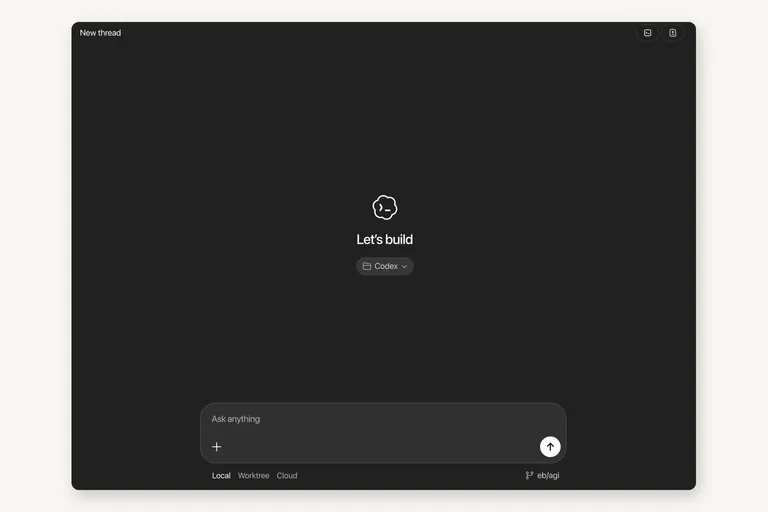
[ fig. Screenshot: the Codex app, captured by Alisher. The three words under the composer are the interesting part. ]
Who Codex is for: anyone already paying OpenAI for a subscription, since the plan covers it, and anyone who wants the cloud option because their laptop closes. Cost: included with a ChatGPT plan, or per token with an API key. What it cannot do: run your local commands when you have sent the work to their cloud, which sounds obvious and surprises people once. What I use it for: as the second opinion. Two agents that disagree about a diff are more useful than either one alone.
Gemini CLI is Google's, and it is the one that asks least of you to try. It is open source, it signs in with a Google account and a free tier that is generous enough to form an opinion on, and it refuses a folder it has not been told to trust, which is the right first instinct for this tier. Who it is for: anyone who wants a capable agent without deciding on a subscription today. Cost: nothing to start, an API key or a paid plan past the free limits. What it cannot do: match the ecosystem around Claude Code, where skills and hooks and connections have had longer to accumulate. What I use it for: reading a folder of documents and answering one question about them, which is the job a free tier is genuinely good at.
Antigravity CLI is the command line of the agent manager from the previous piece, and it is invoked as `agy`. Google's version of the permission story is the most explicit of the five: the modes have names, and they go from `strict` through `request-review` to `always-proceed`, with a `proceed-in-sandbox` mode and an `--sandbox` flag beside them. Trusted folders and the allow list are settings, plugins can bundle skills and rules and MCP servers into one install, and a print mode runs a single prompt and exits. Who it is for: people who want the sandbox to be a setting they chose rather than a claim in the marketing. Cost: it comes with the Antigravity product; check the plan page on the day, this corner moves. What it cannot do: tell you the whole truth in one command, because the shell wrapper's help does not list the commands that only exist inside a running session. What I use it for: watching it, mostly. It is the newest of the five and the most opinionated about how agents should be managed.
opencode is the open-source one, and it is worth naming because the limit it removes is the account. It runs in the terminal, it takes the provider you point it at, and nothing about it requires a subscription to a company that also makes the model. Who it is for: anyone who wants the agent to be a program they can read and change. Cost: the tool is free, you pay whoever serves the model tokens. What it cannot do: hand you the polish of a funded product, and the rough edges are real. What I use it for: nothing regularly yet, and I would rather say that than pretend otherwise.
And the editors from the previous piece have shipped their own command lines, Cursor's included, so the same agent can run with the editor closed. Who they are for: people who already pay for the editor, since the agent is part of the same bill. Cost: included with the editor subscription. What they cannot do: be the reason to switch editors, which is not a selling point anyone claims. What I use them for: the same tasks as the terminal, on the machine where the editor is already installed.
Reading the change
The habit that makes this tier safe is one sentence long. Read the change, not the claim about the change.
In practice that means the diff, in full, before you move on. It means knowing that a session which ran four commands and edited two files will show you all of it, and that the part you skip is the part that bites. It also means noticing where the suggestion in the input line came from. In the capture above, the sentence sitting in the prompt box was written by the tool, not by me. It is a good suggestion. It is still not your idea, and the difference matters when you are the one responsible for the change.
Where it pays off outside coding
The name of the tier says coding, and the useful half is not coding at all.
A folder of notes. Six dated files, six small entries, merged into one journal with the dates preserved and the originals left alone. Two minutes of work, and the kind of work nobody does by hand on a Tuesday evening.
Files that need a rule applied. Thirty photographs with three naming conventions, or exports with dates in the middle of the name. This is a one-sentence task with a real diff.
Documents you have to read anyway. A folder of reports and one question: what changed in the numbers this quarter. The answer cites the files it read, which is how you check it.
A chore on a timer. The same command, in a scheduled job, so it happens without you. That is the next tier's subject and not this one's, and the reason it works here is that the tool is a command that runs and exits.
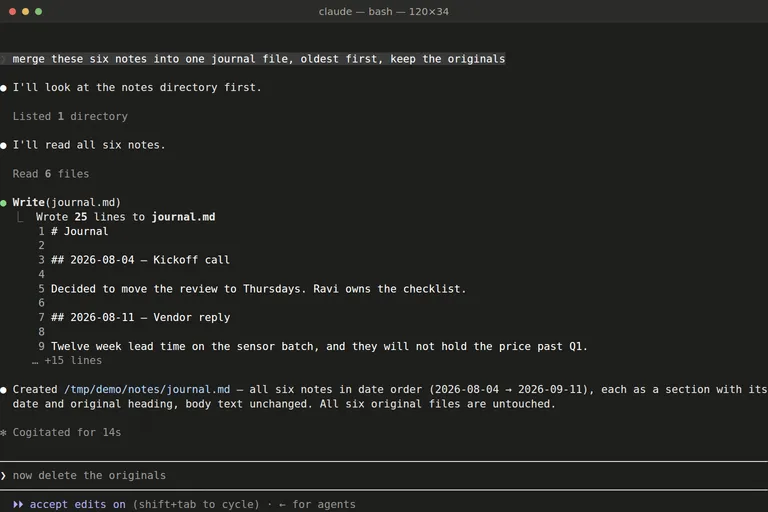
[ fig. The non-coding half of the tier: six notes read, one file written, nothing deleted. ]
The honest summary
The tiers below this one ask you to think about wording. This one asks you to think about access. The model is no longer answering from memory; it is acting in your folder, which is why the permission mode and the allow list are worth ten minutes of your attention before the first real task, and why five minutes of reading a diff afterwards is cheaper than any of the alternatives.
Start in one project, in the asking mode, with something small and checkable. Add the allow rules you find yourself approving twice. Keep the diffs short. If the tier still feels like a leap, that is because it is one: nothing else in this ladder changes what the software can do to your machine, and it changes nothing about your judgement.
Everything in this series is filed under The AI ladder. Next: running a model on your own machine, then the second brain that reads itself.
More in the series
- From a chat box to a second brain: choosing your approach to AI
- Google's stack: what's actually in it
- ChatGPT like a pro
- Claude, end to end
- Desktop apps and editors
- Command Line Interface agents reading
- Running a model on your own machine
- The second brain that reads itself
- Automation: agents that run without you
- What's worth paying for