Running a model on your own machine
Tier three asks one question that none of the tiers below it ask: who is holding the model. Until now the answer was always a company, and the cost was either a subscription or a meter running on someone else's machine. Run the model yourself and both of those change at once, because there is no meter and no account.
Everything below is tier three, the tier where the assistant sees your files, and the part of that tier where the files never leave the room. The trade is honest and worth stating before anything else: you pay for privacy and independence with hardware, patience and electricity, and for most people the arithmetic does not favour local. I run it anyway, and this piece is about when that is a sensible thing to do.
[ fig. Tier 3, the local half: the pieces you install, as marks. ]
Why bother
Four reasons, in the order they matter to me.
Privacy that is structural, not promised. A prompt that never leaves your machine cannot be logged, reviewed, used for training or handed over after a subpoena. That is not a policy you read on a page; it is a fact about where the electricity went.
No meter. Every other tier bills you per token or per month, which makes you think about length. Long documents, many attempts, a script that runs a thousand prompts overnight: all of it is free at the margin, and not thinking about the meter changes how you use the thing.
It works with the cable unplugged. On a plane, in a basement, on a train through a tunnel. Small models are genuinely useful for summarizing, rewriting, extracting and translating, and all of those keep working when the network does not.
You own the tool. The model is a file. The server is a program. Nothing can be deprecated out from under you, and no company can decide that the version you liked is now a legacy plan.
What you need, in one list
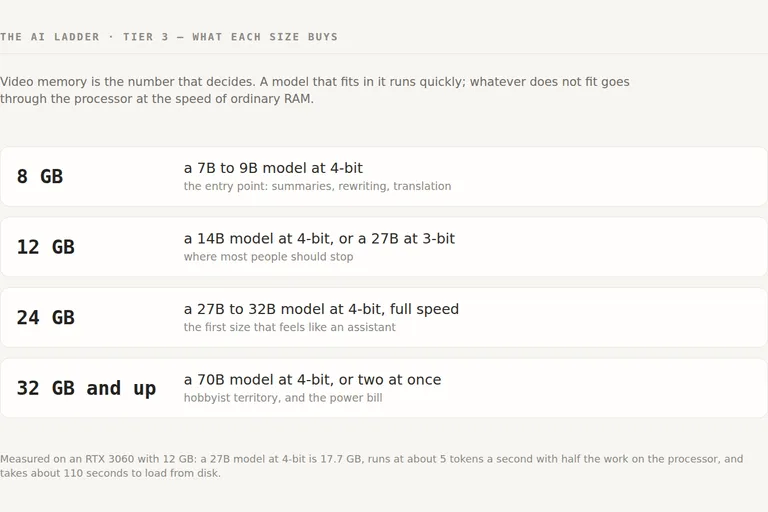
The number that decides everything is how much memory the model needs, and on a machine with a graphics card that means video memory. If the model fits in VRAM it runs quickly, and if it does not, the part that does not fit goes through the processor, where speed drops to whatever your ordinary RAM can deliver.
8 GB runs a 7B to 9B model at 4-bit. The entry point, and better than its reputation: summaries, rewriting and translation are what most days actually need.
12 GB runs a 14B model at 4-bit, or a 27B squeezed to 3-bit. Where most people should stop, and the size I am on.
24 GB runs a 27B to 32B model at 4-bit at full speed. The first size that makes local feel like a real assistant.
32 GB and up runs a 70B model at 4-bit, or two models at once. Hobbyist territory, and the electricity bill starts to matter.
Two honest notes on that list. The sizes move, because a newer architecture with a smaller attention cache fits more context into the same memory. And an older card with enough memory beats a newer one with less, because for this job memory capacity is the spec that decides.
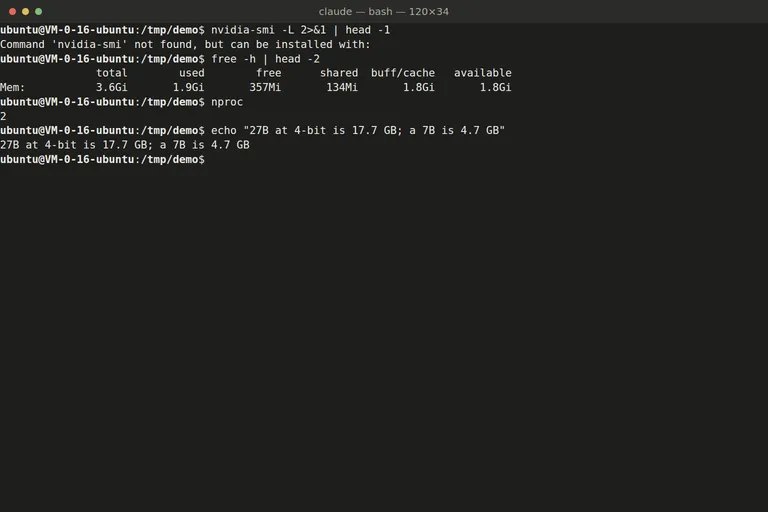
[ fig. The census I run on a machine before promising it anything, captured on the server that hosts this site: no graphics card, 3.6 GB of memory. Knowing that number first is the whole discipline. ]
The arithmetic, with my own numbers
Here is what the tier actually costs, measured on my machine: a Ryzen 5 3600, 32 GB of DDR4 and an RTX 3060 with 12 GB.
A 27B model at 4-bit quantization is a 17.7 GB file, so 5.7 GB of it sits in ordinary memory. That spill costs what RAM bandwidth costs: around 38 to 42 GB/s on dual-channel DDR4, against several hundred on the card. The result was about 5 tokens a second, roughly half the work on the processor, and raising the offload limit changed nothing because the card was already full.
Squeezing the same model to a 3-bit 13.5 GB file made it about twice as fast, and the quality dip was visible on facts and code and mostly invisible in ordinary conversation. A 2-bit 10.9 GB version fits completely and runs three to four times faster than the 4-bit, and it is a last resort rather than an option. Loading the 17.7 GB file from disk took about 110 seconds the first time, which is the wait nobody warns you about.
So the arithmetic is this. A subscription costs about twenty dollars a month, and the card that runs a 27B model at usable speed costs several hundred and burns around 200 watts under load. If money is the reason you are considering local, local loses. If privacy, ownership or working offline is the reason, local is the only thing that does the job at all, and the cost stops being a comparison and becomes a purchase.
Installing it, in three steps
Three programs, and they stack. All three are free.
1. Ollama is the engine. It downloads and manages model files, serves them over a small local API, and gives you a command line to talk to them. On Windows I would skip the installer and take the portable zip: it needs no registry entries, writes nothing to the system drive, and starts only when you double-click the launcher beside it. Two environment variables move everything onto another disk, one for the model store and one for its own settings, and a third decides how long a model stays loaded between questions.
Who it is for: anyone who wants a model running in ten minutes and does not want to learn an inference engine. Cost: free, and the models are free too. What it cannot do: give you a chat interface, because it deliberately has none, and be tuned as finely as a hand-built command line setup. What I use it for: everything local. It is the layer I script against, and the one I leave running.
2. The interface. A model server speaks an API and shows you nothing, and a terminal is fine until you want history. Open WebUI is the standard answer, and it is a chat application that talks to the server: conversations that stay, a model switcher, file uploads, and the small conveniences that make a local model feel like a product. It installs from a single command, keeps its database in a folder you choose, and connects to the local server on the first run. Who it is for: anyone who will ask questions more than once. Cost: free, self-hosted, and it brings its own small embedding model for document search, about a hundred megabytes. What it cannot do: make a slow model fast, and its first start takes half a minute while it builds its database. What I use it for: the everyday chat window, pointed at whichever model is loaded.
3. LM Studio is the third shape, and for many people it should be the first thing they try: one application, a built-in model browser, a settings screen with the memory and context knobs visible instead of hidden in flags, and a small server you can switch on so the rest of your tools can use it. Who it is for: anyone who wants to compare models without learning a command line, and anyone who wants to see why one model is slower than another. Cost: free for personal use, with a paid tier for commercial use. What it cannot do: run as a service you forget about, because it is a desktop application first. What I use it for: trying a file before I commit it to a place in my own setup, and checking how much memory a model really wants.
Which models to run
Three rules survive every model that has come and gone.
1. Fit decides, not fame. A model that fits in memory at a lower quality beats a better model that spills to the processor. Start with what your memory can hold comfortably.
2. Quantization is a dial, not a mistake. The 4-bit version of a given model is the normal choice, the 3-bit is the speed option with a visible quality cost on precise work, and anything below that is a compromise you should make knowingly.
3. Small models are good at small jobs. Summarizing, rewriting, extracting, translating, answering questions about a document you just gave it. Ask a 7B model to write a program across five files and you will learn the difference between tiers in one afternoon.
What I have installed today is one 27B model in two quantizations, the 4-bit file for anything where the answer has to be right and the 3-bit file for when I would rather wait less, plus one small embedding model that the interface uses to search documents. That is about forty gigabytes of disk, and the pair costs me the choice of which one to load rather than money.
When local loses
Three cases, and they are the common ones.
Long documents. The context a model can hold is memory, and memory is what you were short of. A hosted model will read a three-hundred-page report without you thinking about it.
Anything that needs real reasoning. The gap between a 27B model at home and the frontier models has narrowed but it has not closed, and on hard problems you will notice exactly where it is.
Anything time-critical. At 5 tokens a second, a two-thousand-token answer is seven minutes. That is not a slow answer, that is a different kind of activity, and one of the reasons I still pay for a subscription.
There is a fourth cost that is not a case but a habit: the maintenance. The first month is exciting, the third month is a server you forgot to update. Nothing breaks on its own, but everything eventually needs a version bump, and if you do not enjoy that part, the hosted tiers are cheaper than your own attention.
The honest summary
Local models are not the cheaper way to get a good assistant, and anyone who sells them that way is selling the hardware. They are the only way to get an assistant that is private by construction, that works when the network does not, and that nobody can decide to discontinue. That is worth paying for, and it is worth paying for deliberately: pick the size that fits your memory, install the engine, then the interface, and give it the jobs it is actually good at.
Start with the free engine and one model that fits comfortably. If summarizing a document you would have read anyway felt useful, the rest of the setup pays for itself. If the wait for the first token annoyed you more than the privacy pleased you, you have your answer, and it cost an evening.
Everything in this series is filed under The AI ladder. Next: the second brain that reads itself, then the chores that run without you.
More in the series
- From a chat box to a second brain: choosing your approach to AI
- Google's stack: what's actually in it
- ChatGPT like a pro
- Claude, end to end
- Desktop apps and editors
- Command Line Interface agents
- Running a model on your own machine reading
- The second brain that reads itself
- Automation: agents that run without you
- What's worth paying for