Automation: agents that run without you
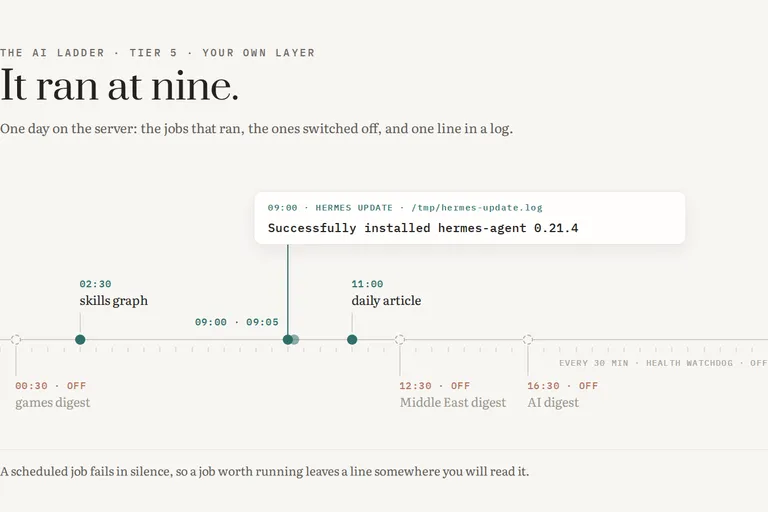
The ladder in this series has five steps: ask something, let it know you, let it see your work, let it act, then build your own layer. This piece stays on the fifth step, your own layer, and looks at the part of it that works while you are asleep. Not the assistant you talk to, but the jobs you stopped talking to: the ones that fire at nine in the morning whether or not anyone is watching.
The premise sounds like good news, so let me state it plainly and then distrust it. Anything you do every week can be handed to a machine, and the machine does not get bored. True, and incomplete. The machine does not get bored, but it also does not notice when it has stopped, and neither, it turns out, do you.
What earns a job
I have a filter now, and it has three conditions, all of which have to hold at once. A chore earns a scheduled job only if it is recurring, boring and rule-shaped. Nothing else.
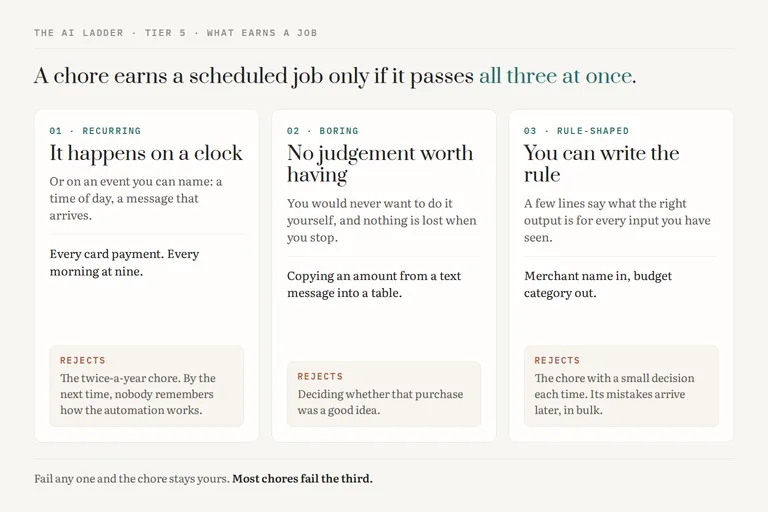
[ fig. The filter for what earns a scheduled job. All three conditions at once, and most chores fail the third. ]
Recurring means it happens on a clock or on an event you can name. A task that comes up twice a year is not a candidate, because by the time it comes round again you will have forgotten how the automation works, and so, quite possibly, will the automation. Boring means you would never want to do it yourself, because it involves no judgement worth having. Copying an amount from a text message into a table is boring. Deciding whether that amount was a good idea is not. Rule-shaped means you could write down, in a few lines, what the right output is for every input you have seen. If you cannot write the rule, you do not yet understand the chore well enough to give it away.
The filter rejects more than it passes, and that is the point. Most of what people want to automate fails the third test: it is recurring and boring, but every instance needs a small decision, and a job that makes small decisions without you is a job whose mistakes you will find much later, in bulk.
Three ways to hand a chore over
There are three ways to do it, and the difference between them is not power. It is what each one leaves you owing.
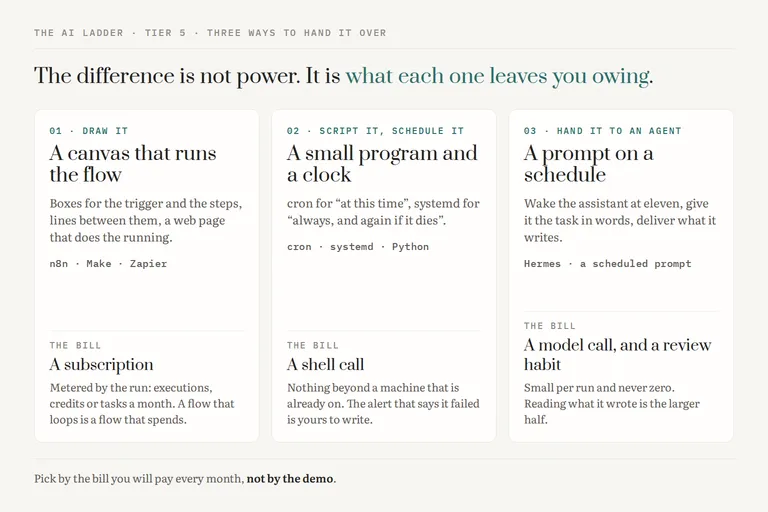
[ fig. Three ways to hand a chore over, compared by what each one leaves you owing: a subscription, a shell call, or a model call and a review habit. ]
Draw it. A visual builder: boxes for triggers and steps, lines between them, a web page that runs the flow. The field has three names worth knowing.
n8n. Who it is for: someone who wants a canvas but would rather own the machine it runs on, because it can be self-hosted. What it costs: the self-hosted Community Edition is free, and the cloud plans are metered in workflow executions per month, with 2,500 on the entry plan. What it cannot do: spare you the server, if you host it yourself: then its updates, its database and its uptime are yours. What I actually use it for: nothing on this server, which is all I can vouch for, so read this paragraph as the field's report and not mine.
Make. Who it is for: someone who wants a canvas and a vendor that runs it. What it costs: a free plan with 1,000 credits a month and two active scenarios, and paid plans from $9 a month. What it cannot do: run more often than every fifteen minutes on the free plan, and it bills by the credit, so a flow that loops is a flow that spends. What I actually use it for: nothing, and the same caution applies.
Zapier. Who it is for: someone who needs two popular apps to talk and never wants to see what is in between. What it costs: free for 100 tasks a month, where a task is a step that succeeded (failed ones are not counted), limited to two-step flows checked every fifteen minutes; the Professional plan starts at $19.99 a month billed annually. What it cannot do: anything its connectors do not already cover, cheaply, at volume. What I actually use it for: nothing, for the same honest reason.
Script it and schedule it. A small program and something that starts it: cron for "at this time", systemd for "always, and again if it dies". Who it is for: anyone who can read thirty lines of Python or ask an assistant to write them. What it costs: nothing beyond a machine that is already on, and each run is a shell call. What it cannot do: tell you it failed, unless you wrote the part that tells you. What I actually use it for: the expense bot, which systemd keeps alive, and most of the jobs below.
Hand it to an agent. A scheduled prompt instead of a scheduled script: at eleven, wake the assistant, give it a task in words, deliver what it writes. Who it is for: chores where the input is prose and the output is prose. What it costs: a model call on every run, and the habit of reading the result, which is the larger bill. What it cannot do: be exactly right twice, so it is the wrong tool for anything a rule could do. What I actually use it for: Hermes, my assistant, keeps its own list of scheduled jobs, and a daily writing job is the one that still has a model attached.
The honest summary is that the canvas is a subscription, the script is a shell call, and the agent is a model call plus a review habit. Pick by the bill you are willing to pay every month, not by the demo.
Two chores from this house
The first is the expense bot, and it is the most useful thing on my server.
My bank sends a text message for every card payment. An iOS Shortcut on my phone picks up that message and forwards its text, with a token in the header, to a small Python server on my machine. The script, `expense_bot.py`, parses the amount, the date and the merchant, maps the merchant to a category, and writes one row into Notion, where the row is linked to the matching Budget and to the month it belongs to. systemd runs it as `expense-bot.service` with `Restart=always`, and it listens on port 8080. Since early August its log records 155 rows written.
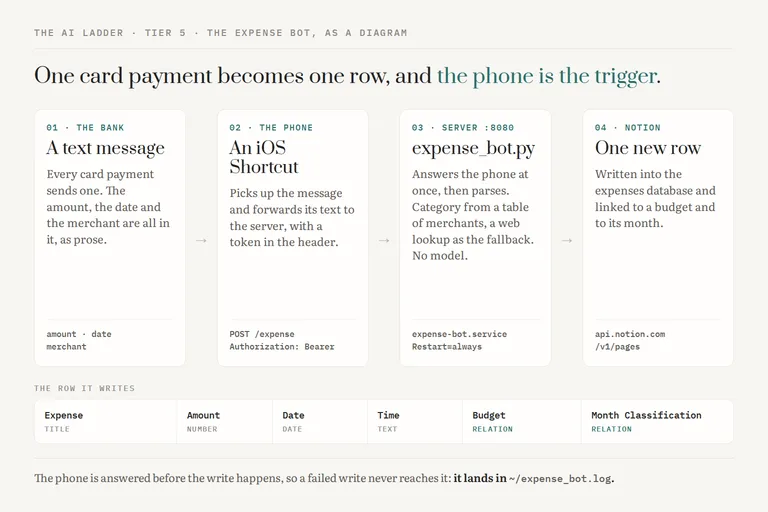
[ fig. A diagram, not a screenshot: the expense bot's real shape, from a card payment on the phone to one row in Notion, and the six fields it writes. ]
The Shortcut deserves its own paragraph, because it taught me the lesson I would pass on first: the trigger shape matters more than the destination. Notion was never the hard part. The hard part was that the fact I wanted, an amount of money, arrives on my phone as an event, and nothing I build on a server can see that event unless the phone hands it over. Once the trigger was "a message arrived" rather than "I remembered to type it", the rest was plumbing. There is one quirk worth copying. The server answers the phone at once and does the Notion write afterwards, because a Shortcut will not wait for a slow lookup. That keeps the phone happy, and it also means the phone never hears about a failed write.
The second chore is the digests, and they are on a list. Hermes runs nine scheduled jobs, and this is that list, captured on the machine while I wrote this piece.
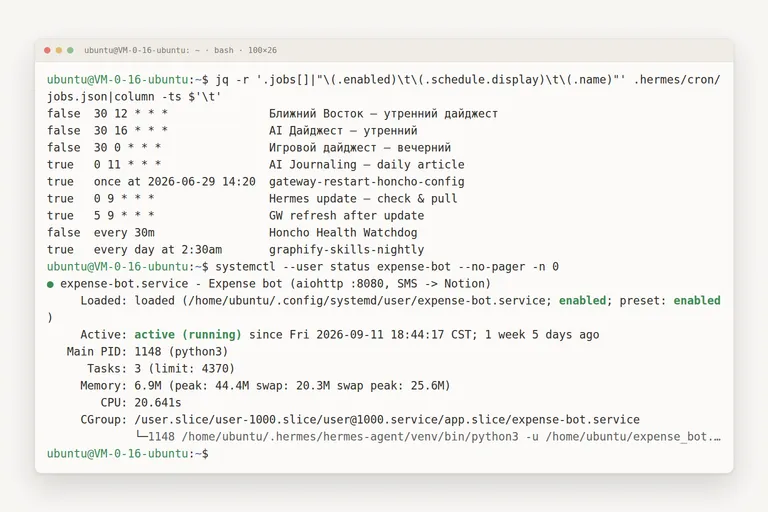
[ fig. A real session, captured on the server while writing this piece: the nine jobs as they stand, and the expense bot running for twelve days without a restart. ]
Three of the nine were digests: news from the Middle East, news about AI, news about games, each written by a model and delivered to a chat. All three are off. One job is a writing job at eleven, which does run a model. One, at nine, checks the assistant for updates and pulls them, and it is a plain command with no model attached. One refreshes the gateway five minutes later, one rebuilds a skills graph at half past two at night, and a health watchdog that ran every thirty minutes is off too. The ninth is the one I will come back to.
A detail that only shows up on a real list: the server keeps a different clock from mine. The "morning" digest was scheduled for 12:30, which is half past eight where I live.
When a rule is enough, and when a model earns its place
The expense bot has no model in it. You would expect it to need one, since sorting purchases into categories sounds like judgement. It turned out to be a table: a list of merchant names and the category each belongs to, with a web lookup as the fallback for a merchant the table has never seen. It is wrong occasionally, and when it is wrong it is wrong the same way every time, which means I can fix it with one line.
That is the test I apply now. If the right answer can be written down, write it down. A rule is cheap, fast, and it fails loudly and identically. A model is the right tool when the input is prose that no rule can parse and the output is prose that no rule can produce: a news digest is exactly that, which is why those jobs had a model and the update job does not.
A model in a scheduled job earns its place only if someone reads what it writes. Its errors are fluent, so an unread digest is not a harmless digest. It is a confident paragraph nobody checked, arriving every day.
Noticing, three weeks later
This is the section the whole piece exists for. A scheduled job does not fail the way a program you are using fails. It fails in silence, and the silence looks exactly like a quiet day.
[ fig. Three layers of noticing, and the failure each one catches. Only the weekly glance catches a job that never ran. ]
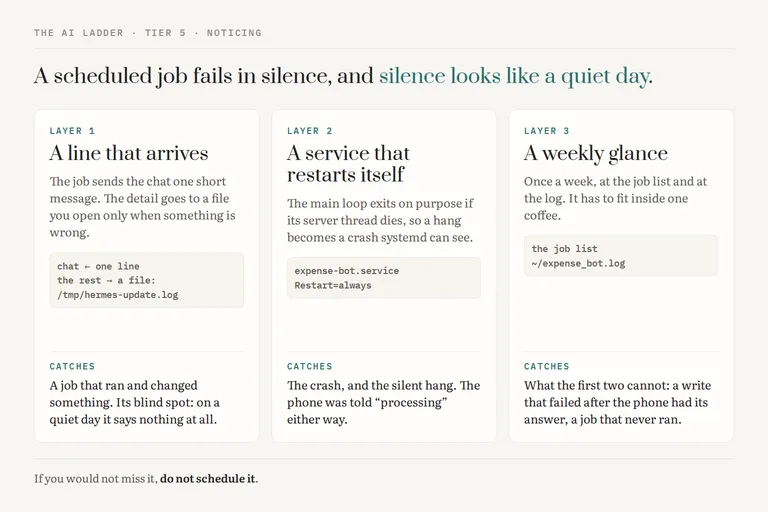
I watch in three layers, and each one catches a different failure.
A line that arrives. The nine o'clock update job keeps everything it did in `/tmp/hermes-update.log` and sends the chat one short message: what changed, and that the gateway will restart in five minutes. The detail is in a file I open only when something is wrong, and the chat gets the one line I can read in a second. Its weakness is honest. On a day with nothing new, the job stays silent by design, so silence means either "nothing to do" or "never ran". I accept that because the assistant also records the last status of every job, and that record is where the second meaning shows up.
A service that restarts itself. The expense bot has `Restart=always`, and its main loop exits on purpose if the server thread dies, so a silent hang becomes a crash that systemd can see and undo. This catches the failure you would never notice from the phone, because the phone was told "processing" either way.
A weekly glance. Once a week, at the list and at the log. It is the only layer that catches the failures the first two cannot: the two Notion writes that failed on 21 September, which reached the log and nothing else, and the ninth job. The ninth job was a one-off gateway restart, created one evening in June for a time earlier that same afternoon. It has never run. Three months later its status still says scheduled, and nothing ever told me.
The digests are the other half of that lesson, and the reason three of the nine are off. A digest is a message you did not ask for on that particular day, so its absence is invisible. I noticed that I would not notice if one stopped, and a job whose silence I cannot tell from its death is a job I should not be running. If you would not miss it, do not schedule it.
The bill, and the maintenance bill
The money is the easy part. The expense bot costs nothing beyond a server that was already on. The update job is a shell call. A digest costs a model call a day, which is small per run and not zero, and it is the only line on the bill that grows when you add a job.
The maintenance bill is the one people skip, and it is paid in attention. A bank changes the wording of its text messages and the parser misses the amount. A store you have never visited sends the lookup somewhere odd. The log grows to five megabytes, most of it strangers knocking on port 8080 with malformed requests, and a log that size is a log nobody opens. None of this is dramatic, and every piece of it is a small, recurring, rule-shaped chore, which is to say exactly the kind of thing this piece is about, except that this one is mine.
So the budget I use is not money. It is the weekly glance. Every job I add has to fit inside it, and when the glance starts taking longer than a coffee, something gets switched off. That is how nine jobs became five that are switched on, one of which has never run, and I would rather know that than have nine.
Start with one chore that passes all three tests, script it, and give it a line that arrives. Then leave it alone for three weeks and see whether you still know it is working. Everything in this series is filed under The AI ladder. Next, and last: What's worth paying for.
More in the series
- From a chat box to a second brain: choosing your approach to AI
- Google's stack: what's actually in it
- ChatGPT like a pro
- Claude, end to end
- Desktop apps and editors
- Command Line Interface agents
- Running a model on your own machine
- The second brain that reads itself
- Automation: agents that run without you reading
- What's worth paying for